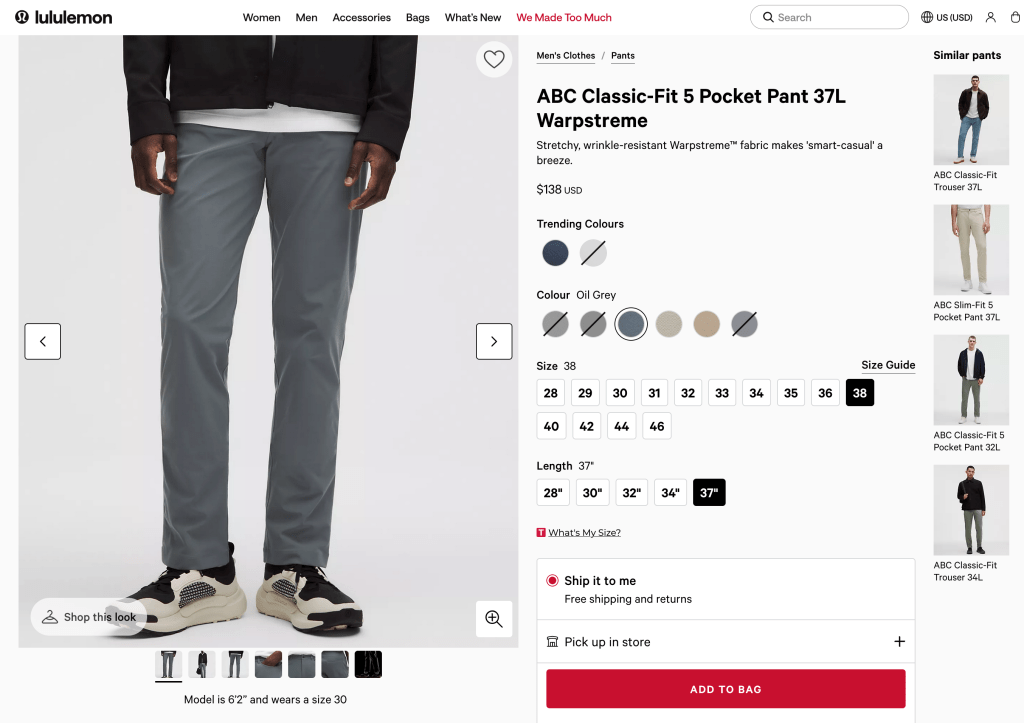
So I have an Clothing for tall men post for good reason – at 6’10” there are few options. Recently, I was watching this video about workwear and he briefly compares the crotch gusset to that of the Lululemon ‘ABC’ pant. I was intrigued, so I watched his video about the ABC Pant, in which is quite positive. This is unusual, he’s expert and incisive. It sounded like an honest to god well-made, well-designed functional pair of trousers for an acceptable price ($138 as of today, or $117 after the signup discount.) I also have a Lululemon gym bag from work (freebie for getting a patent) and it surprised me at how much I like it. So I was curious enough to go to their website and check them out:
Dude! 37″ inseam! That’s my size.
My pair arrived today; I’ll spare you a picture but they are excellent – beautifully made as the video explained (No B surfaces anywhere), have a good phone pocket and a sub-pocket for the Victorinox, inseam is long enough, super soft and comfortable and the tech-pant-sheen is minimal.
(The guesset is as described. ABC. Look it up.)
Anyway, Lululemon basically only has the 5-pocket as their tall size. Nothing in shirts or other trouser styles, but these are 100% wheelhouse for me and I’m quite pleased. I think they will be perfect for my next travel adventure, and of course bike errands or at the office. A bit pricy, but I actually feel for once that, having watched the teardown video, I’m actually getting value for my money. That I can recommend. That earns it a place on #YouShouldBuy.
I was in an around music and music production for a long time, so I’ve long enjoyed the Song Exploder podcast where “musicians take apart their songs, and piece by piece, tell the story of how they were made.” Not every episode has music that I like but hey, it’s a podcast, skip those.
I wanted to post about today’s episode, which took me all the way back to high school: Thompson Twins “Hold me now”. It’s fantastic.
My favorite is probably Chvrches “Clearest blue”. But peruse the episode list and see if anything looks interesting. If you’ve never heard a song explained, you will be surprised at the time, love and craft behind a pop song.
I have a complicated history with ham radio. Years ago, a friend/co-worker and I got our one-day ‘Technician’ licenses, and for years after that I tried to make first contact. Like, talk to anybody. I learned about bands and power and radios and repeaters and programming software and hackable firmware and only managed walkie-talkie on FRS and GMRS. Suuuper frustrating.
I was recently emailing a former co-worker (Hi, Jon!) who’s taken up ham radio as hobby and somewhere in there we started talking about Meshtastic. Then in December it made front page on either Tildes or Lobsters and I was intrigued. Especially this story about using it on sailboats. And this followup post. I also sometimes watch his videos, so this Jeff Geerling post was also valuable.
Key bits:
It’s inexpensive – radios are $50 to $150, repeaters $100 to $300. Software, protocol and firmware are all open source.
It’s in the no-license-required ISM spectrum, meaning that you don’t need a ham or GMRS license.
It’s low power, so a radio can run for days, a repeater can be compact and solar-powered and you don’t need to plug stuff into the wall.
No need to drill holes in my house for coax or power because of #3.
It’s super limited: Line of sight, text messages. No pictures, no web pages.
It looks like low-stakes fun to learn and use.
Radio and repeater programming is via a web page – no programs to install! Yay Web Serial.
Based on some research, I ordered
Two Seeed SenseCAP T1000-E cards (waterproof, 2 day battery, GPS included) via Amazon for $51 each.
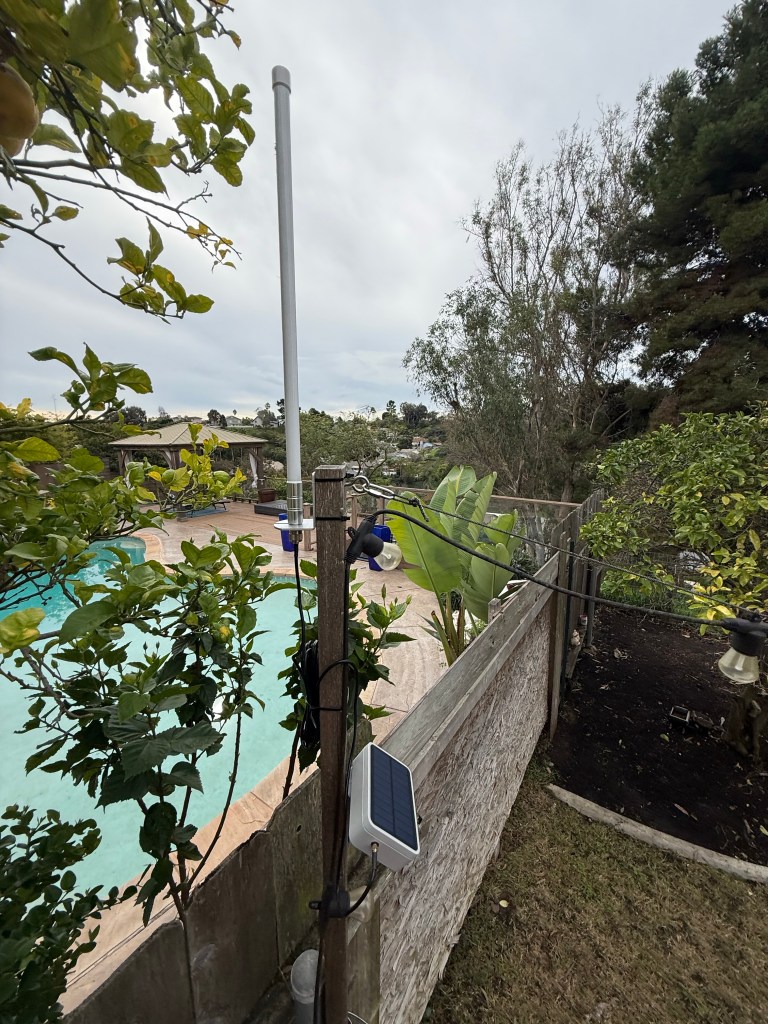
Note that I’m simplifying here a bit – the repeater came later, and the antenna was a recommendation from the ‘San Diego Mesh’ Discord.
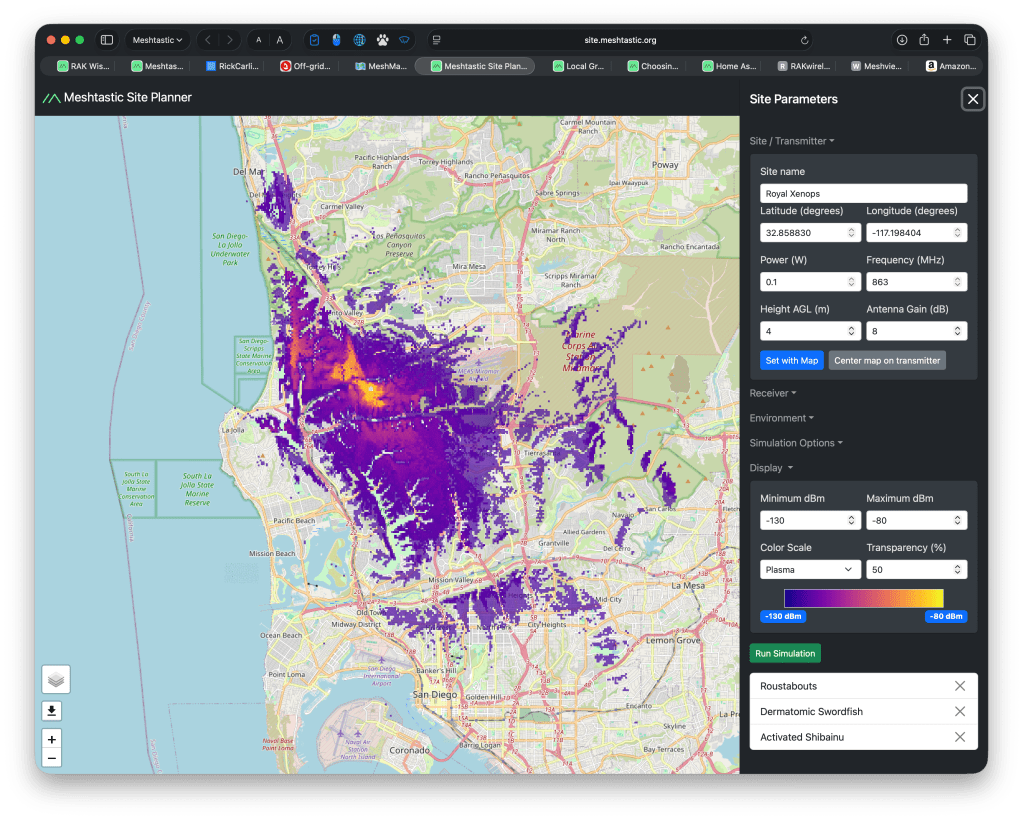
The Meshtastic site planner predicted that the repeater + antenna would provide incredible coverage. Remember that this is based on a tenth of a watt! Like, less than a single display LED:
Cue detours in aforementioned Discord group, learning about device roles and the tyranny of Long-Fast, and I was back to not being able to talk to anyone.
In searching for help, I found that many folks had gotten frustrated with the design tradeoffs of Meshtastic and had started a newer project called Meshcore to address them:
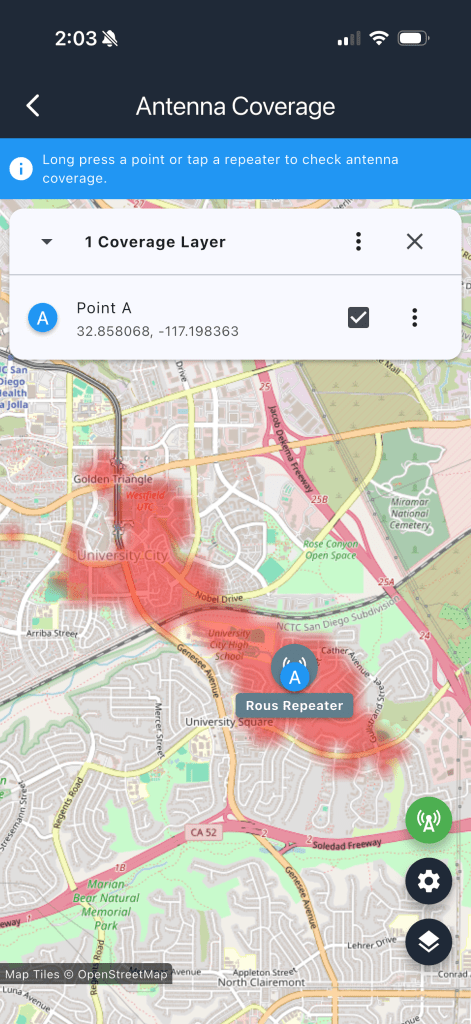
So I spent half a day building and installing the repeater in the back yard only to a) not see traffic or get more than a single response and b) the estimated coverage was really shit:
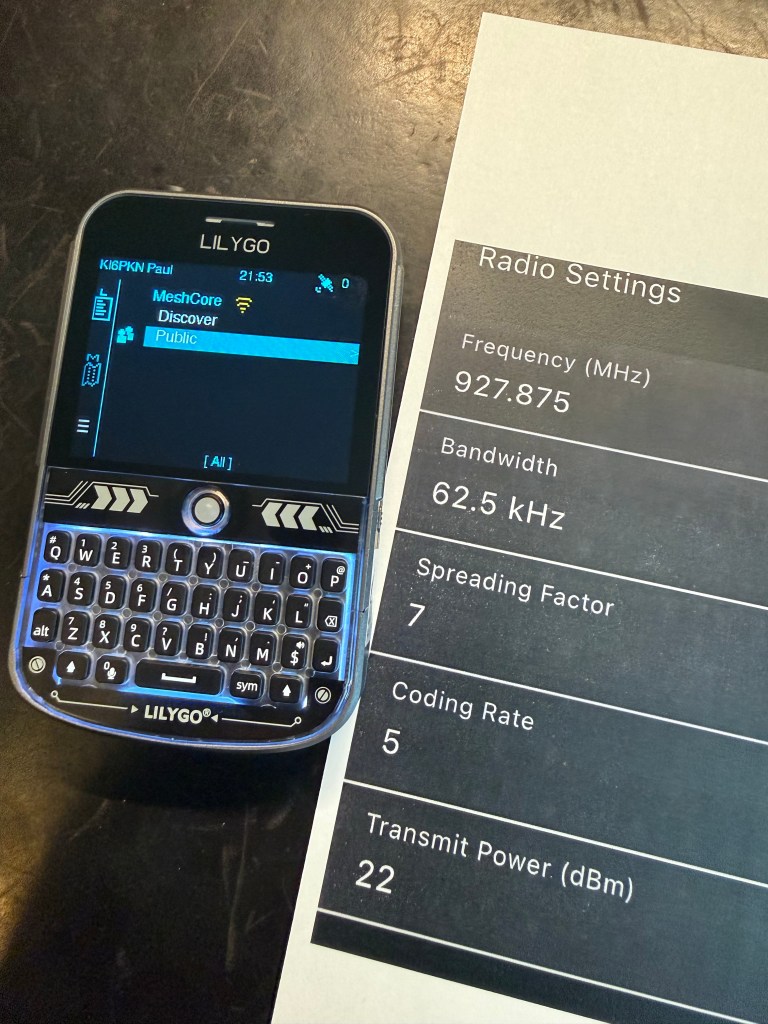
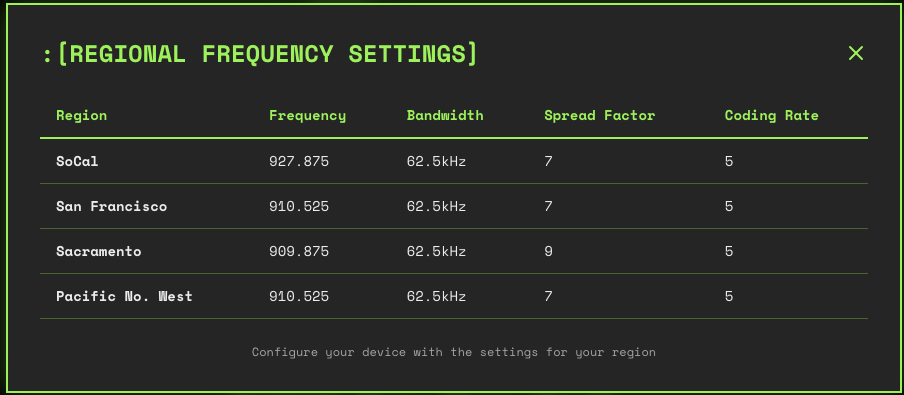
One of the folks on the Discord sent me the key information: as seen on the West Coast Mesh page, local radios do not use the USA presets for frequency, bandwidth, spread factor and coding rate. I had been talking to no one! Here are the correct settings:1
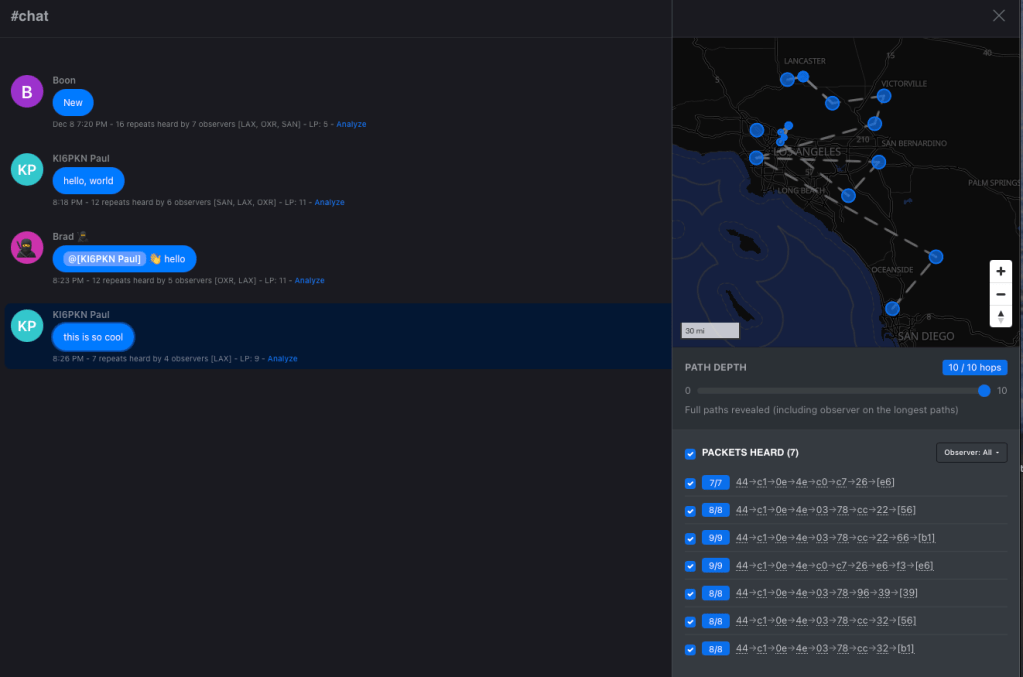
That made the difference! Now I can see and talk to people. Here’s a chat from me, using the iOS app to a T1000-E card to the repeater, going 10 hops to get north of Los Angeles:
One of the two T1000-E cards is basically bad – after DFU reset, it’ll program and then not work. The WisMesh Tag from RAKwireless is supposed to better and more reliable. Others have also had issues with the T1000-E.
The Lilygo T-Echo sorta works.
The Heltec V3s all murder batteries – like an hour. Get V4 or something else.
The repeater seems to be good, but you gotta get that antenna way up high. I will try to do so – roof? PVC pipe as mast? Tree? Dunno yet but right now I can’t reach the friend I’ve convinced to try this with me.
It’s not super useful. The real uses are stuff like cellular outages, off-grid camping/hunting/hiking, remote no-infrastructure land use and nerding out.
My repeater is now showing up on on the WCMesh Map after I uploaded it. I am unreasonably pleased with this. Repeater public key is 4450A0B0C86FC09D7193196DE7C29078AACFB2999E75F06FE2C41C7E35861434
There’s a ‘room server’ feature where you program a radio to basically be a BBS / IRC server. This looks really cool, I see quite a few on the network and looks fun to try out.
Hashtag channels are public and ad-hoc. Try #test, #chat as well as the Public channel. Locally we’ve also got #sandiego.
Check this for a local group and their Discord. That got me unblocked several times, as well as advice on antennas and more.
Hardware I’d recommend to try it out based on a week or so:
Lilygo T-Deck+. I got mine from Amazon but it took weeks to arrive. Maybe look for in-stock.
If you need a repeater, my Wismesh Repeater Mini seems good. I like that it’s install-and-forget due to the solar+battery, plus I can check and administer it locally with Bluetooth or over the Meshcore network using the app. The consensus on Discord was that the 8dBi antenna is essential once you get past basic local use.
If you want to spend the least in order to see if anyone’s using it locally, I’d suggest checking the maps above first and then trying the WisMesh Tag or T-1000E cards.
Here’s a workshop and showroom tour of the Melanzana cut-and-sew shop in Leadville, Colorado. Here’s an interview with Melanzana’s founder, Fritz Howard. Melanzana produces all of their clothing in Leadville, a town of about 2600 people which, at over ten thousand feet above sea level, is the highest incorporated city in the US. This makes it challenging for them to expand production, and ultimately constrains their growth as a company. They handle this partly by selling the vast majority of their product in-person at their showroom, which actually requires appointments for most purchases and has a per-customer, per-visit limit on the quantity of clothing one can purchase.
I find Melanzana’s business strategy counterintuitive and unexpected, and I suppose it helps to explain the fact that I was totally unaware of Melanzana until a couple of months ago, when I was given one of their hoodies more or less by accident. What has remained a mystery, though, is the honestly shocking amount of attention this hoodie has received since then; it’s easily the most commented-upon garment I’ve ever owned, with both friends and strangers calling the brand out by name and complimenting the sweatshirt’s frumpy yet somehow athletic drape. I guess this is all to say that Melanzana seems to have forged their own idiosyncratic moral framework, and has somehow managed to convince a large number of New Yorkers that that framework is worthy of their attention.
I did a bit of looking and the video by MyLifeOutdoors was convincing – I managed to time a release on the site and bought the micro grid hoodie. It’s gonna get a lot of wear, and I figured it for something worth sharing. Melanzana reminds me of the Patagonia ethos – made for use, treats the employees well, does repairs and isn’t trying to grow endlessly. Good stuff.
As I have written about before, taking your phone to a protest is 100% going to get you written into various government data stores. This story today confirms that ICE is using Stingrays.
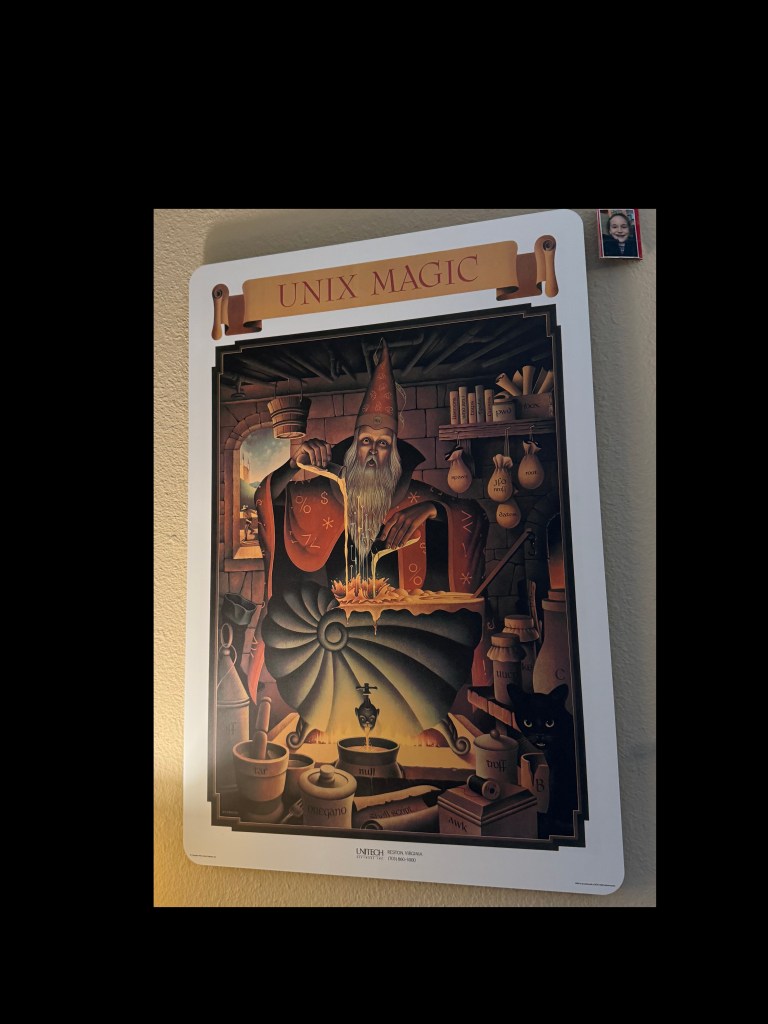
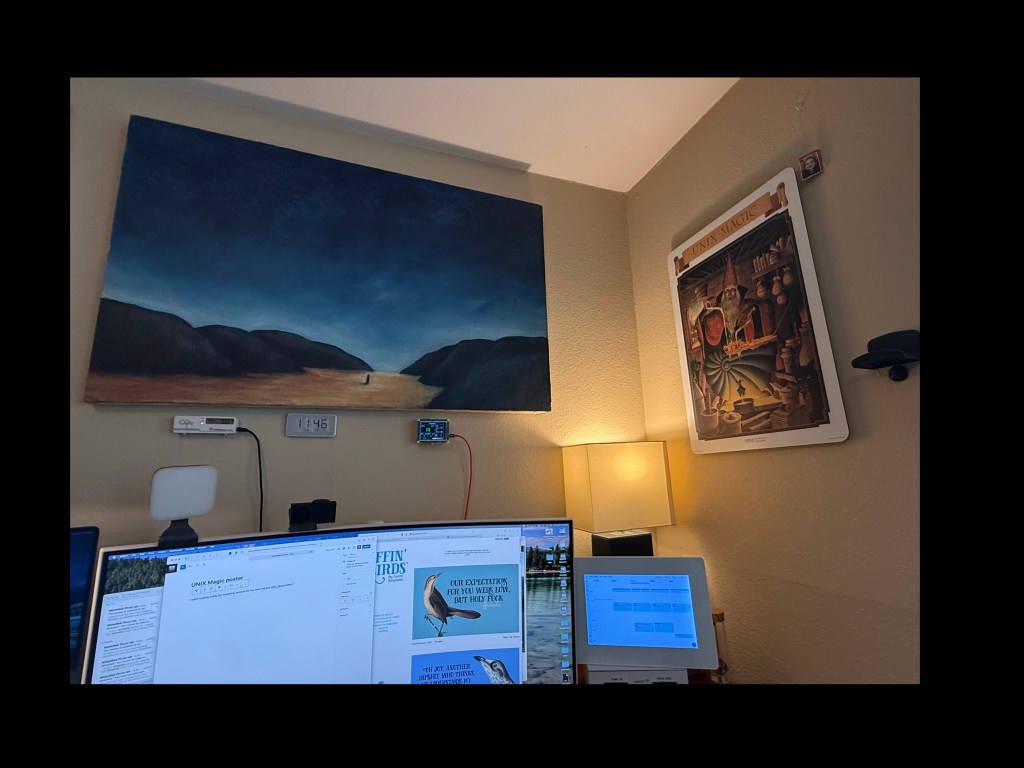
I went looking today for mounting options for my new! signed! Effin’ Birds poster and my first thought was how much I like the aluminum dibond on my UNIX Magic poster:
then I realized that I had never blogged it! So back in 2021, I read this story via Hacker News about a legendary 1970s conference poster full of inside Unix jokes and references, was instantly smitten and ordered one:
Anyway, the Unix poster is all that and continues to occupy a place of honor, right in the corner of my eye, because frankly my entire career has been Unix in various forms: Linux, NetBSD and OpenBSD, Irix, SunOS, Solaris, AIX, and others that I can’t recall any more. I’m counting MacOS since yeah, it’s Unix with a professional makeup, and so are Android and IOS.
(The time spent on OS/2, BeOS, Windows flavors, Desqview, GeoWorks, DOS… well, ahh well)
Now its time to add my signed EB poster – my better half bought this for me at ComiCon 2025:
So this is a mixed post – yeah, you should totally get a unix poster, you can DIY it for much less than the fancy print. Secondly, Effin Birds is awesome, I also have his wall calendar and some conference tchotchkes.
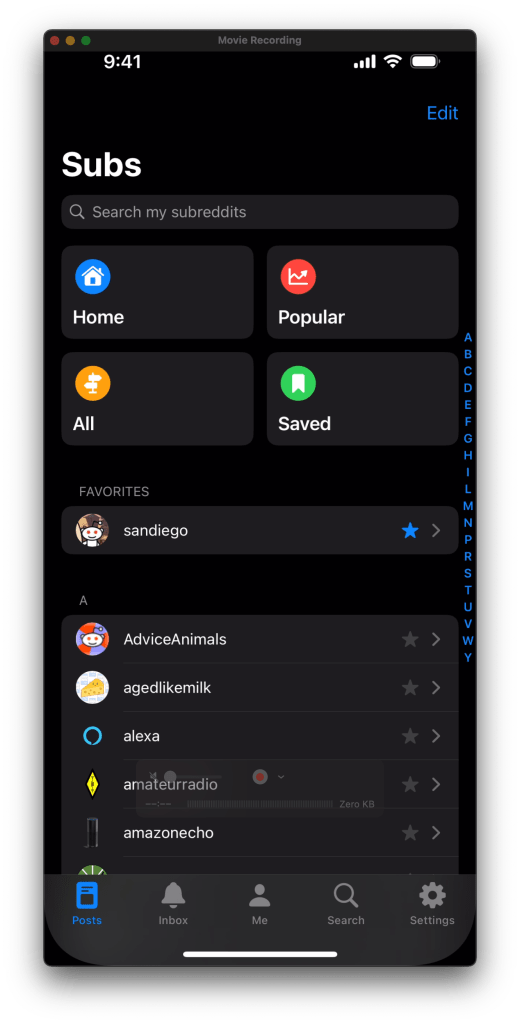
So a while ago, Reddit enshittified after taking PE money. Turned off the APIs, blocked third-party apps, etc. And the official app is a really shitty ad-laden experience. So. Do you have
A Macintosh
some code/build experience
and iPhone or iPad
the desire to read Reddit
A $99/year Apple Developer account
Stubborness?
The details would take ages to type out, thus numbers 2 and 6. Drop a comment if this is useful and I’ll write a followup; right now I’d guess I have maybe two-digit readership.
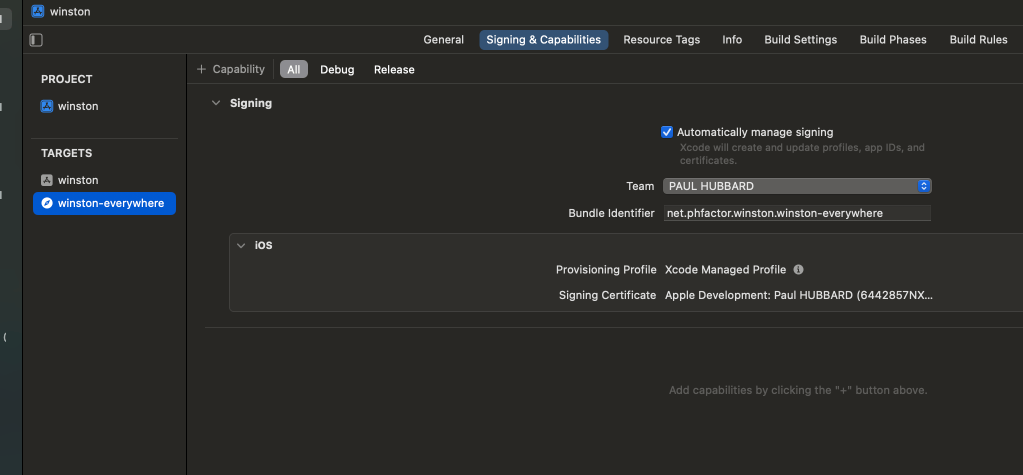
The source code that you want is called Winston, here on GitHub. Yes, like 1984. Clone it, load it into Xcode, and then modify the two bundle identifiers. I use the net.phfactor prefix since that’s my domain; be creative but they have to be unique to Apple.
I vaguely remember that you need to create a Reddit developer token which is also painful (See #6) but only needs doing once. The results are well worth the hassle. I just pulled main and rebuilt today after my build expired. (The $99 developer device builds are only good for a year. Apple forces everything through their App Store and this as close as they allow. Yes, it sucks.)
It will not come as news to anyone streaming music via Spotify, Apple Music, Amazon, Tidal, etc – the playlist is the proprietary bit. The music is identical but your curated playlists are a barrier to moving.
I’m in love with this “Halloween” playlist because it isn’t cheesy songs like the Monster Mash and Ghostbusters, instead, it’s an adults’ Halloweenish soundtrack featuring great moody music from bands like M83, the Cure, the National and more. This plays nonstop at my house from Labor Day through the end of October.
But I don’t use Spotify. Because of the subsidized hardware, we use Amazon to stream to a bunch of Echos connected to speakers.
The solution is a free web app called Tune My Music. It’s free, and Amazon lists it as an approved way to import playlists. It can go back and forth between a great number of services, but for me I just setup a new Spotify account (yay hide my email!), granted access to TMM, and then playlist access to Amazon music, and it copied it over. Only one track was missing; good enough.
So maybe a bookmark in case you want to move between services.
Nearly perfect but just too fragile, leading to lots of orders:
They are nearly ideal. Zero flavor retention, easy to clean, great for hot coffee and ice cold beer and tea and sparkling water. I get the 18oz version in two packs. Plus they insulate well so no condensation and I can savor.
But they break so damned easily. Which is why I’ve repurchased so many times.
A while ago the Wirecutter recommended a glass lined bottle from Purist and I bought one. It’s as promised but the shape is too deep to hand wash and the lid is impossible to clean internally. so off I went.
And yes I firmly believe that coffee flavor is best from a wide opening shape and glass or ceramic. Reddit agrees… mostly.
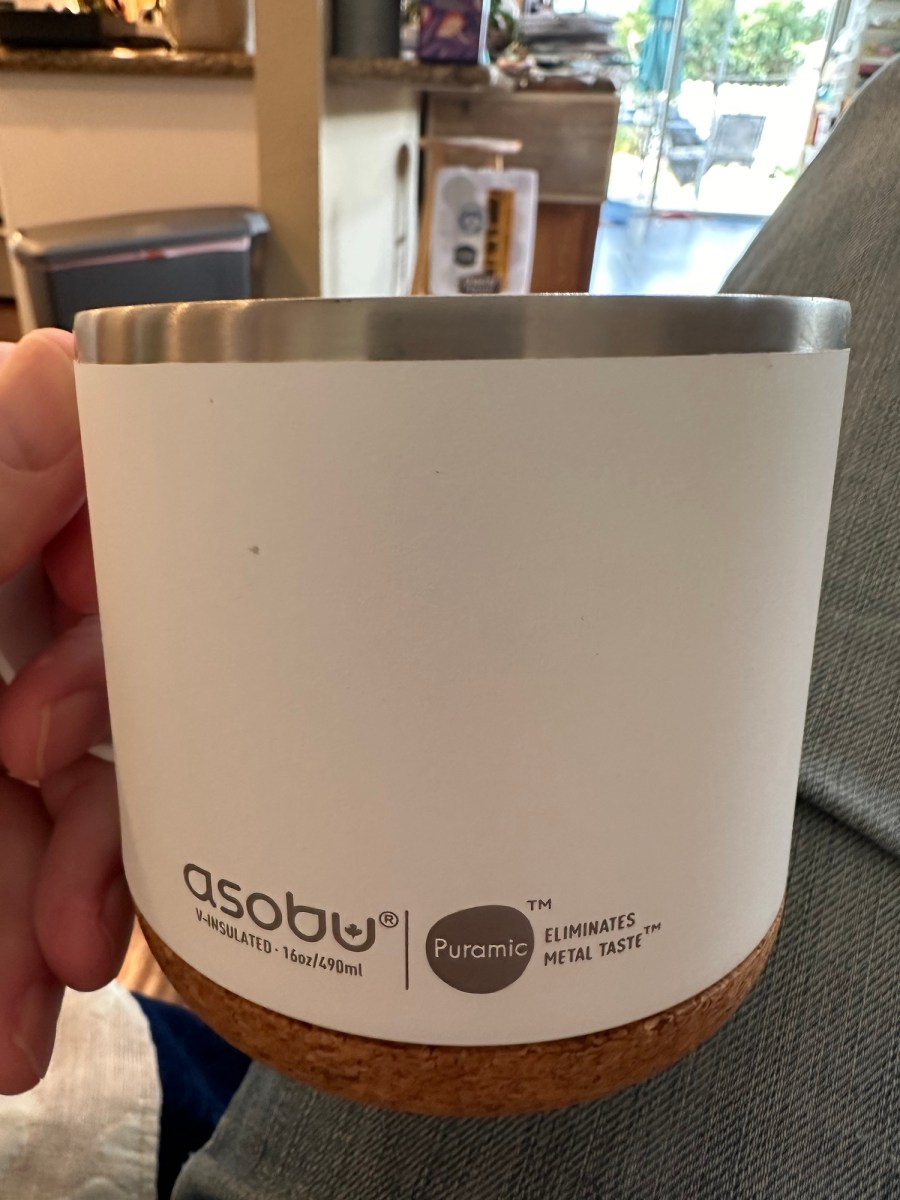
The main features I want are insulation, glass or ceramic lining and large at 16oz or so. Two full cups from my French press. I found this Asobu:
It’s… excellent. Super slick coating, insulated well, a breeze to clean, coffee tastes great. Nice and wide so the aromas are good.
The shape is a lot like my Yeti that I still have.
I’ve had it a few days, rigorously testing with coffee, tea, sparkling water, beer, mint tea and it’s great. Super slick ceramic, nice cork, wide and stable, good value at $30. Worthy of my YouShouldBuy category!







 ultracrepidarian