

Why
So here’s the thing: the world is a big, busy place, and there’s a lot going on. You probably need to keep an eye on it. I probably don’t need to tell you that Twitter is full of bots and Nazis, Facebook is a horror show and just searching for a term can lead to ads following you around the internet. How to cope?
As a computer engineer, I also have to keep up with a bunch of topic areas, and if there’s time I want to read about my hobbies, interests and passions too. And if I’m up at the wee hours, I’d like to have something to read. Let me show you how to do it!
Tab Sets for breakfast
I thought that everyone knew about these, but this week a web-dev co-worker was surprised by them, so I’ll explain. If you create a folder in your browser bookmarks, then you can open all of them at once. Here’s my morning tabs in Safari:

(Judge away 😉 )
If you click on that last thing, Open in New Tabs, you get this:

Thats basically my morning newspaper: News, comics, weather, local, plus my power monitor and more. Simple, fast and easy to customize. Highly recommended.
I also use iCloud to share my bookmarks across machines, so when I update my tab sets they also go to my iPad and iPhone. Useful, and only takes a few KB so the free 5GB iCloud plan suffices.
Ad blocking
Ahh, who doesn’t love an autoplaying video ad?

To block ads, you need defense in depth. Here’s my current system that I recommend:
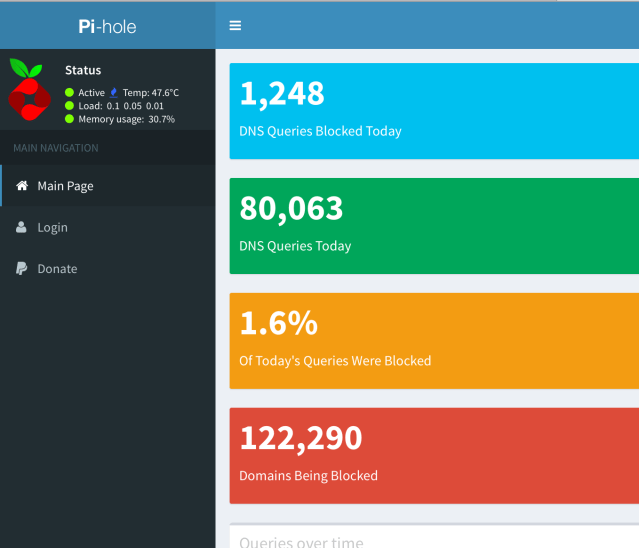
- Run (free) Pi-Hole on a Raspberry Pi on my home network. This is complicated, requires editing your DHCP servers’ configuration and some network-fu, but once done every device on your WiFi gets automatic ad blocking of entire ad networks. Boom.
- Run uBlock Origin on Safari and Chrome. Works pretty well, and is easy to toggle on and off if a site has issues.
- Use ‘kill sticky‘ to remove headers, footers, pop overs and more. I love this trick, and it’s perfect: Tiny, local, free and fast. Works on iOS too!
- On iOS, I combine Unobstruct, Crystal, Purify, 1Blocker, Better, MadBlocker and Sanitize. Many of these cost a few dollars; do NOT hesitate to spend the money here. ‘Free’ ad blockers, unless they’re from places I trust like Mozilla, are usually selling your data or running a protection scam on advertisers. Lifehacker has a good intro on how to use ad blockers.
- Ghostery and Duck Duck Go Privacy Extension for Safari.
- Change your search engine to Duck Duck Go. It’s not always as good, but when it fails just repeat the search with a ‘!g’ suffix and it’ll repeat the search on Google.
Blocking Video Ads
This is more difficult. The PiHole helps if they are hosted on an ad server, but my best tools is youtube-dl. It’s a deceptively powerful, self-updating, open-source Python app that can download from YouTube, Vimeo and many others. You can grab a video, extract the audio if you want, and save it for later, minus the ads. Brilliant.
RSS is your secret weapon
Wired has it right, it’s time for an RSS revival.
Five years ago, when Wolf took over The Old Reader, he offered a prescient insight: “How long will it be before your Facebook stream is so full of promoted content, bizarre algorithmic decisions, and tracking cookie based shopping cart reminders that you won’t be getting any valuable information,” Wolf wrote. “For as little as $60, a business can promote a page to Facebook users. It won’t be long before your news feed is worthless.”
Personally, I’ve been running RSS for over a decade, and currently have 411 RSS feeds:
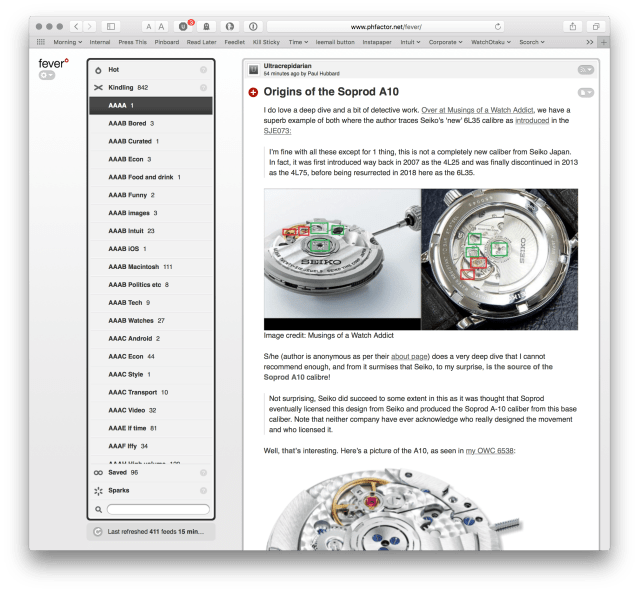
With the demise of Fever it’s no longer possible to replicate my setup. Which sucks; running your own RSS server on your own computer really is ideal from a privacy and performance perspective. So I’ll try and recommend alternatives.
The Wired post is a good place to start, and I know that friends of mine are partial to The Old Reader but I’d want to dig into anything offered for free and figure out how they pay the bills.
Organizing your RSS feeds
One of the downsides of 411 feeds it that it’s more than you could ever read, though I admit I’ve tried. Here’s what I recommend:
- Group your feeds into, yep, groups, and give the groups names that sort by importance to you. So I have ‘AAAA’ with feeds that I want to never miss, on down to AAAG. It seems silly and excessive, but it really works.
- Separate and use ‘mark all as read’ liberally. I have two feed groups, for example, covering economics, and many days I can’t read all of them. Mark as read and move on; it’s not Pokemon and you can’t possibly read ’em all
Get a native app
This is more subtle, but native apps work better for me: speed, key bindings, SPEED and better OS integration with features like sharing, printing, and so forth.
For iOS, I recently switched from Reeder to Unread, mostly because Unread is much faster to refresh from my server. Speed matters.
On my Mac, I still use Reeder, where it works fine:

For Android, I recommend my very own open source app Meltdown if you, like me, have a Fever server. 😉
Miniflux
Adding Miniflux as a Fever alternative in Oct 2022 – open source, you can self host or use rssreaderone.com (free). Web app with Postgres storage, looks quite nice.
Overview
So in the morning I open and read a set of tabs, and during the day I open Unread in spare time to read. Since RSS is synchronized on the server, when I go back to my laptop I don’t see the same stories; super convenient.
If there’s something I need to follow up on, I often just the low-tech approach of sharing the link from the app and email it to myself. I also use Instapaper and it’s native app, though switching apps bugs me a bit. I’m odd that way.
Paying for news
I subscribe to NYTimes, pay for apps and am a Patreon supporter of my favorite comics. I buy printed comics books too to support the authors, and I’m an annual supporter of favorite sites like Naked Capitalism, Washington Monthly and Truthout. I’m happy to pay for news and such, but I believe quite strongly that I need not tolerate relentless monetization and [censored] annoying ads.








 Image credit: OceanicTime
 Image credit: ABtW
 Image credit: minus4plus6.com
 Image credit: Unknown/Pinterest





 ultracrepidarian