The Empty Core of the Trump Mystique | The New Republic

Another pertinent factor is envy, a basic human emotion that rising social inequality can only exacerbate. To put it in cruder terms: “The world sucks for me, so I am going to make it suck for you too. I have lost my job, my status as a white male, and may even lose my gun. So you, my smug, privileged friend, are going to lose your civil liberties, your faith in social progress, your endangered species, your affirmative action, your reproductive freedom, your international alliances, your ‘wonderful’ exchange student from Syria.”

A stellar and thought-provoking essay.

via The Empty Core of the Trump Mystique | The New Republic

BWV 1008 – Cello suite No. 2 in D minor – All of Bach

One of my ongoing joys in life is a weekly-ish email from the ‘All of Bach’ project in the Netherlands. Not just a well-filmed and recorded performance, but conductor/performer notes and historical context.

I have a few performances of the cello suites, and prefer Rostropovich but this is well worth your time.

It’s odd, I’m used to modern rapid-rewards, short attention span videos so these require a bit of focus to watch.

via BWV 1008 – Cello suite No. 2 in D minor – All of Bach

The Cruelty Is the Point – The Atlantic

Trump’s only true skill is the con, his only fundamental belief is that the United States is the birthright of straight, white, Christian men, and his only real, authentic pleasure is in cruelty. It is that cruelty, and the delight it brings them, that binds his most ardent supporters to him, in shared scorn for those they hate and fear: immigrants, black voters, feminists, and treasonous white men who empathize with any of those who would steal their birthright. The president’s ability to execute that cruelty through word and deed makes them euphoric. It makes them feel good, it makes them feel proud, it makes them feel happy, it makes them feel united. And as long as he makes them feel that way, they will let him get away with anything, no matter what it costs them.

Read the whole thing. I don’t want to devolve into another rant-y political blog, but this is worth sharing.

via The Cruelty Is the Point – The Atlantic

Hardware for gigabit

As part of my series of posts on gigabit Internet connections I had a friend ask about hardware, which is currently spread across multiple posts. Here’s what I’m running with a bit of details for each item. I’ll go from the outermost layer inwards.

Guidelines and goals

All equipment must be low power.

No cooling fans.

Reliability is worth paying extra.

Modem and router

2018-09-25 16.25.23

The modem is supplied by Spectrum, as their only approved model, and is DOCSIS 3.1. A bit bulky but low-power, reliable and delivering the promised speed. It’s linked via a short cable to my Ubiquiti ER-4 router/firewall. I had to upgrade from the ER-X as explained here, I wasn’t able to get line speed out of the ER-X and rather than fight that I upgraded to the ER-4. So far, it’s been great and I recommend it without hesitation.

Backbone switch
2018-09-25 16.25.18

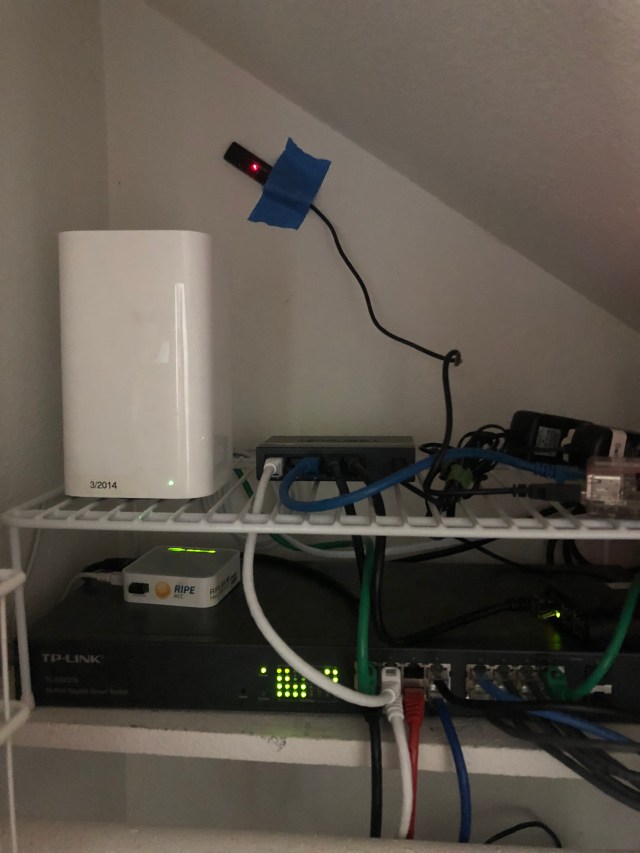
I wanted a backbone that’d handle lots of load, give me the ability to monitor/tweak, and generally be awesome. For an ethernet switch, that means

  1. Fully non-blocking; i.e. handle 100% traffic, bidirectionally, across all ports.
  2. Managed, with a web interface
  3. Media ports so I can add fiber if necessary

I bought the TP-Link TL-SG2216 which is a 16 port version; you can get more ports in the same switch. It’s been a good choice, right now I’ve got some bug with SSL on the web interface but the switch and SNMP have been flawless. I should have paid for more ports; if you squint at the picture you can see a 5-port dumb switch I had to daisy chain in to add more ports. Ahh well.

WiFi

I have had much better luck using access points as opposed to all-in-one, so I use and recommend that. In my case, that’s the no longer sold Apple AirPort Extreme 802.11ac in access point mode. I disable disk sharing, DHCP, etc, etc and it runs for months and months with no problem. Note that I have very heavy usage, with upwards of 50 clients ranging from laptops, IoT, phones, tablets, etc, so the split AP/router configuration should also work for small biz or advanced home networks too.

A bit more detail about Wi-Fi Gigabit internet, the WiFi link.

DHCP and DNS
2018-09-25 16.25.31

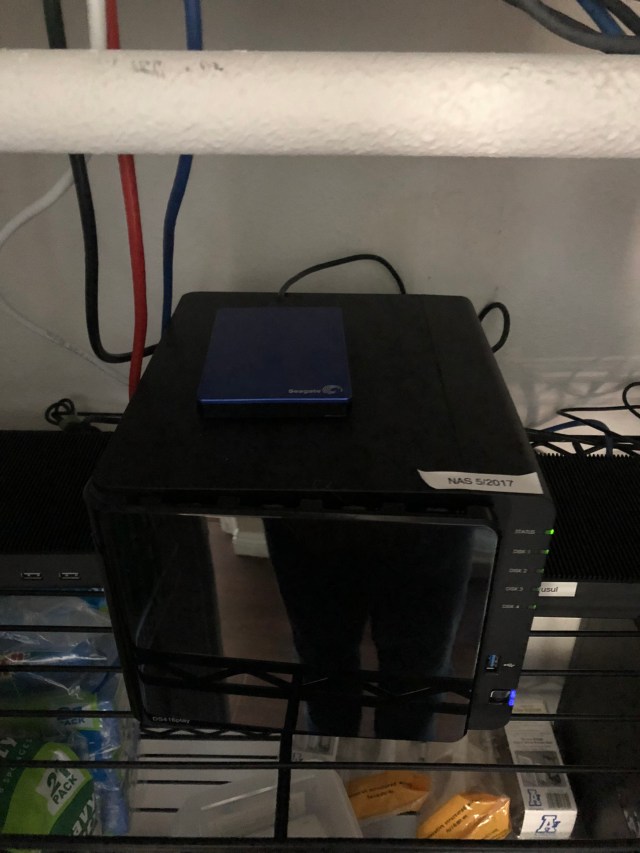
That’s my four-drive Synology DS416play. It’s a drive server, basically, but Synology makes great software so I also run other services on it that I used to host on Debian:

  • Local DNS and forwarding. I can resolve internal hostnames and also forward to 1.1.1.1 and 9.9.9.9 resolvers.
  • DHCP server – hand out permanent and dynamic IPs on my class C subnet.
  • TimeMachine and NFS backup, then mirrored to Amazon Drive for off-site backups.

It’s a great little machine and my second Synology. Quiet, reliable and fast – I run the dual gigabit links to the switch and use the bridged mode, so I’ve got ~200MB/sec available.

Pi Hole ad blocker

I mentioned this in Staying sane and well-read with tab sets ad blocking and RSS – I adore this thing! I use a gen-1 pi for hardware and it provides DNS-level ad filtering for every device on the network.

Note that the DHCP server on the NAS gives out the Pi-hole’s IP as the DNS server to use, and the Pi-Hole is setup to use the NAS as its upstream. That way you get ad blocking plus local resolution. Takes a bit to configure that way but the results are excellent.

Battery backup

2018-09-25 16.25.09

After an outage I added the APC Back-UPS Pro BR1500G and external battery pack. Since the entire set of hardware uses 65 watts, this provides around 300 minutes of power, more than enough to keep running and nicely avoiding server problems due to the short 1-second glitches that I see about once a week.

Events versus logs for serverless

Found via Four short links (side note: this feed should be on your must-read list. Consistently superb.), a fascinating Twitter thread from Charity Majors:

In distributed systems, the hardest part is often not finding the bug in your code, but tracking down which component is actually the source of the problem so you know what code to look at. Or finding the requests that exhibit the bug, and deducing what they all have in common.

The most effective way to structure your instrumentation, so you get the maximum bang for your buck, is to emit a single arbitrarily wide event per request per service hop. We’re talking wiiiide. We usually see 200-500 dimensions in a mature app. But just one write.

🎀 Any and all unique identifying bits you can get your paws on: UUID, request ID, shopping cart ID, any other ID <<- HIGHEST VALUE DETAILS

🎀 Any other useful application context, starting with service name

🎀 Possibly system resource state at point in time e.g. /proc/net/ipv4

The entire thread is worth at least two read-throughs. I’m still pondering.

For me, the current team is more about structured logs into Splunk and extracting metrics and call geometry from UUID and spans, so the idea of a 200-500 element event per call is new, compelling and … feels correct. Like, I need to figure out how to start doing this awesome new thing here too. Especially for serverless, where you can’t log into the server and poke around; all you have are logs and/or events.

The world in ultraviolet

After watching this very cool video I went shopping for a UV camera. They are super rare, much harder to find than the infrared camera I got some time ago. I found the Sunscreenr for $80:

homepage_hero_image_1_1500x

There seem to be, at present, none that are iOS compatible, so this was the best option that I could find. It’s took a while to find an Android device from the pile and get it working. (I had to buy a special USB OTG cable to connect my Yubikey for 2FA, really silly!) but its up and working, and friends, the world in UV is weird:

Things to note: My glasses reflecting and blocking UV (just like it says on the tin), skin damage seems more visible, and my light grey car looks almost black. The sky is grey and my daily face sunblock seems pretty good.

So far, it’s money well spent – I’ve already used it as quality control on the kids’ application of sunblock. It’s a good investment if you live someplace as sunny as this.

Select Star SQL

This is an interactive book which aims to be the best place on the internet for learning SQL. It is free of charge, free of ads and doesn’t require registration or downloads. It helps you learn by running queries against a real-world dataset to complete projects of consequence. It is not a mere reference page — it conveys a mental model for writing SQL.

I expect little to no coding knowledge. Each chapter is designed to take about 30 minutes. As more of the world’s data is stored in databases, I expect that this time will pay rich dividends!

Found this on Hacker News yesterday, a beautiful, interactive and free SQL course. Send this to your junior engineers! I’m passable at SQL, and I had a good time working through some of the problems. It’s well structured and uses a very … unusual… data set.

via Select Star SQL

O&O ShutUp10

O&O ShutUp10 means you have full control over which comfort functions under Windows 10 you wish to use, and you decide when the passing on of your data goes too far. Using a very simple interface, you decide how Windows 10 should respect your privacy by deciding which unwanted functions should be deactivated.

O&O ShutUp10 is entirely free and does not have to be installed – it can be simply run directly and immediately on your PC. And it will not install or download retrospectively unwanted or unnecessary software, like so many other programs do these days!

Bookmarked for if I switch to Windows.

via O&O ShutUp10