1080p webcam for Zoom for $40

Fact 1:In the Covid-19 pandemic, we’re all on Zoom et al quite a lot.

Fact 2: Apple webcams are 720p resolution and quite low quality.

Fact 3: Nerds want to be helpful.

Consequence one: Good webcams are sold out universally.

Consequence two: The people behind the cheap and awesome WiFi webcam brand Wyze have written custom firmware to convert a wireless security camera into a very decent USB 1080p webcam. And it’s free.

Hardware requirements

  1. Wyze webcam v2 – vendor, or Amazon. $26 bucks as of today.
  2. 8GB or so micro SD card. You might have one around if you use Raspberry Pi. I bought this two-pack of overkill 32GB cards, since that’s a useful size for Pi project. $14.
  3. USB3 A to A cable. These are unusual and I had to order one. I bought a two pack so I can have a spare. $12, and cheaper versions exist. Note that your computer needs to have a USB3 port with an A plug – I’m using the one on my LG monitor.

Flash the firmware

Instructions are here on their site – TL;DR is to unzip the download and copy demo.bin into the root directory. Power up holding reset for five seconds. Pretty do-able even for the less technical.

Results

There are two Wyze cameras, basic or a $35 pan/tilt/zoom. I already had two of each, because at $20 to $35 each, they’re in my hobby budget and have been delighted with ’em. I chose the base camera as I see no use for PTZ.

Here’s the built-in webcam from my MacBook. It’s the 2018 15″ model, my work computer.

Now here’s the Wyze:

Color is a bit off, but resolution is a huge amount better. it’s also wide-angle, with strong curvature at the edges.

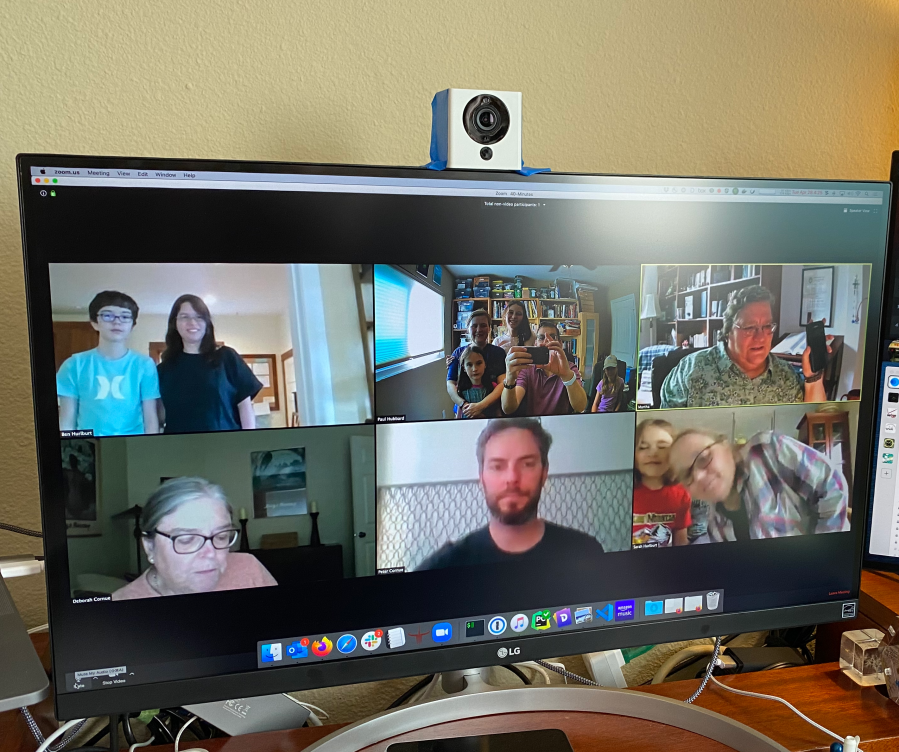
I was just in time for a Zoom birthday party.

Why yes, my family does look sharper than everyone else. And wide angle was perfect for this use. Sometimes you get lucky. You can kinda see my low-rent mounting:
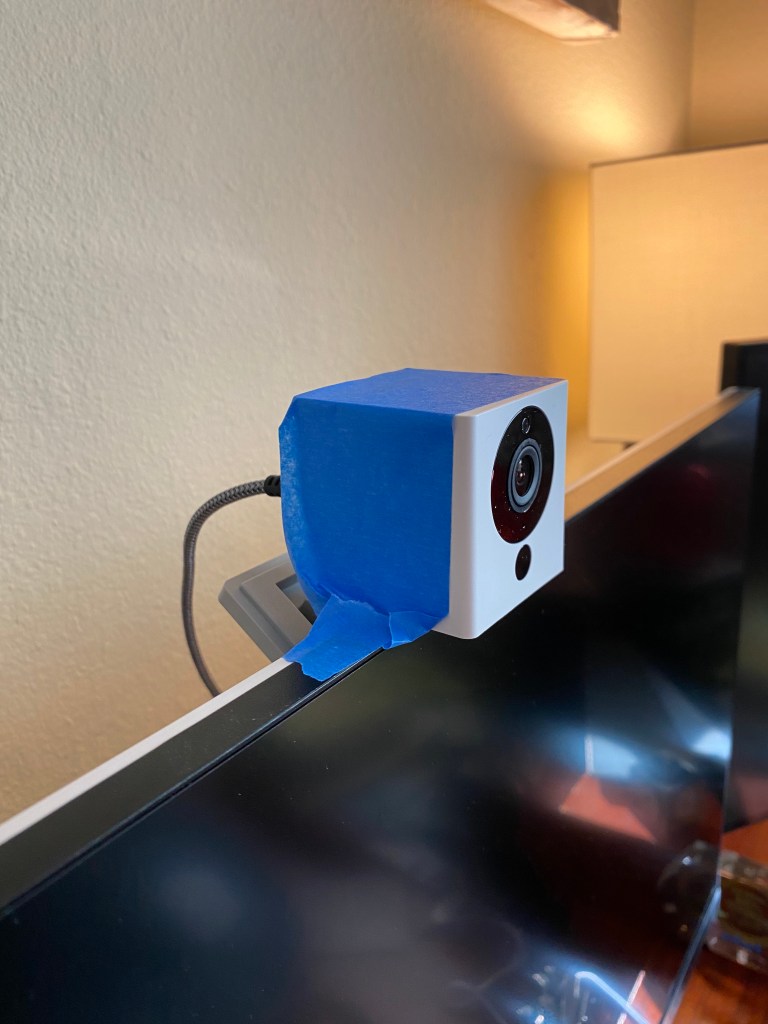
I’ll leave it that way for now, as it makes it quick to move around and try other lighting.

Overall – recommended. Pretty cheap, the parts are versatile, and when this ends you just re-flash the camera to get back to a nice smart camera/IoT device.

50-ish Days Later – The Tao of Mac

I’m pretty much exhausted. “Regular” work plus a few overlapping deadlines plus whatever household chores I can manage and all the random stuff that comes with being permanently home means I can’t find the time to relax, let alone do something borderline creative.

50-ish Days Later – The Tao of Mac

A better phrasing than I’ve been able to manage. As a 4-year veteran of permanent WFH (heck, my team even created Slack before Slack), I had expected to cope better than I have been. But the side projects, home projects, workouts, etc, etc… have all gotten scant focus.

Who knew. It’s hard to focus in a pandemic.

Six feet is the wrong model

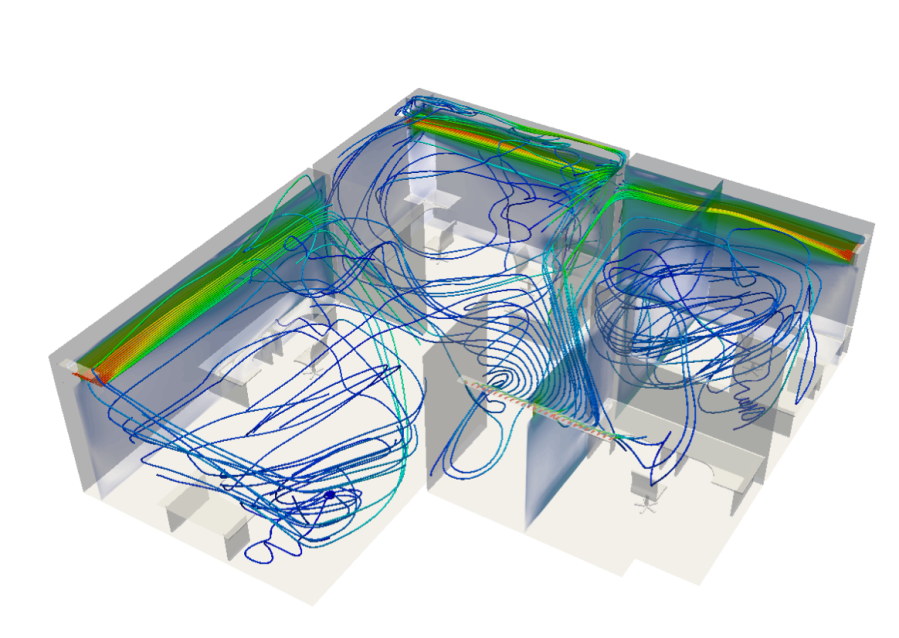
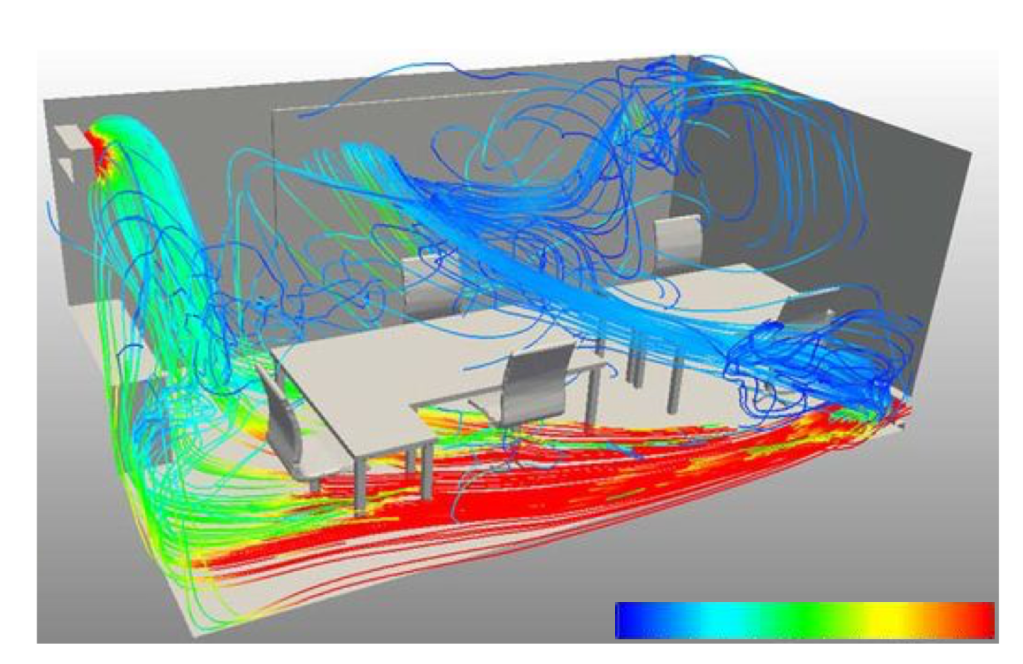
A friend sent me this paper on Arxiv.org – “A physicist view of the airborne infection” by Luis A. Anchordoqui and Eugene M. Chudnovsky. They used SimScale to model airflow in an office and included a couple of nice visualizations:

The paper is quite concise and worth your time, just under 2.5 pages. Short version? Six feet ain’t enough and your office is a Petri dish.

From the physics point of view, we cannot find a good justification for a stationary 6-feet separation in a situation when people spend long time together in a room. Droplets containing the virus move in the air via convection. The convection pattern in a room can be very complex; see Fig. 1. It depends on the location of air conditioners, radiators, windows, and all items in the room, as well as on people producing vortices by moving around. The existing vortices in the air can make a location far away from the source of droplets more dangerous than the location 6 feet away. This applies to meeting rooms, office spaces, supermarkets, department stores, etc. The airflow pattern should be studied for all such facilities to avoid the spread of infection to large distances from a single infected person. The safest rooms must be those equipped with the air sucking ventilator at the top, like hospital surgery rooms

Luis A. Anchordoqui and Eugene M. Chudnovsky

https://arxiv.org/pdf/2003.13689.pdf?referringSource=articleShare

Damn it Apple

Apple Music on iOS has turned into a ad-infested shitshow of dodgy UX patterns that verge on deceptive; where the big obvious click signs you up to become a positive number on some Apple ARPU dashboard.

This sucks. Quite a lot. You literally cannot be rid of this incessant upsell bullshit. Fucking Apple, I pay a premium to avoid this shit.

My current solution is OK but has limitations – the paid iOS app ‘Cesium’. Two bucks on the App Store. Reliable, no ads, none of the upsells and I’m a happy customer. It can’t download music, bummer, and I’ve not tried the playlist editing but overall at least it works and doesn’t try to scam me out of more money.

Introducing Watchsmith – David Smith, Independent iOS Developer

Watchsmith is an application that seeks to give you complete control over the appearance and utility of your Apple Watch. First, it provides a wide array of complications. Each of these is completely customizable, with controls for things like font, color, hand type and location1. The initial set is just over 50 unique complications, with dozens more planned down the road. My goal is to provide a complication for just about every use and let you make it look just how you want. In the absence of 3rd-party watch faces, this is the closest I can get to making my own watch faces.

Introducing Watchsmith – David Smith, Independent iOS Developer

Insta-download. Yeah, I got a v5 Apple Watch a week or so ago and wow how they gotten better since the launch version I bought when they first came out. Anyway, Watchsmith looks quite clever and promising, and its free to try out.

His privacy policy is fantastic:

Other than these two cases, no personal data ever leaves your devices. Unless you email me for support, I will have no information about you or what you do within the app.

I don’t want the responsibility of managing your data correctly, so I don’t collect it, which I think is better for both of us.

Lockdown Apps

Found via Hacker News – free and open source tracker and ad blocker, works on-device using VPN hooks. That means that it’ll block in apps as well as Safari. I’m trying it now.
Note – they pay their bills with the subscription-billed VPN but you can decline that and just use the blocker. That’s what I’m trying.

For iOS devices and Mac only.