
Spent a few semi-pleasant hours today to get this working:
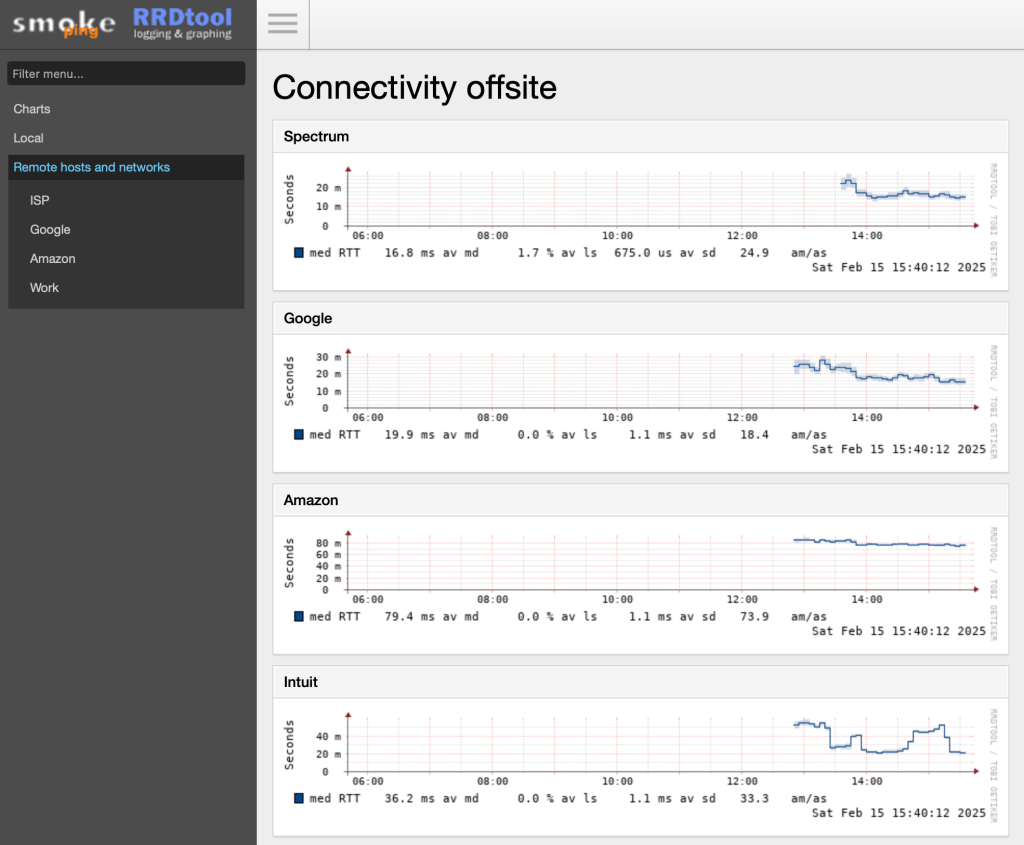
That’s Smokeping, proxied by Caddy2 on my love-it-to-bits Raspberry Pi4 web server.
Smokeping lets you track not just the yes-we-are-connected / no-we-are-not, but latency and packet loss and jitter. My network and ISP are generally solid, but this is an easy tool to have around. Once, that is, you have it installed.
I run Debian on my Pi, natch, and the wondrous Caddy to serve files and reverse proxy the various web apps. Not to mention automatic SSL certs from LetsEncrypt and the least verbose configuration possible. Smokeping, alas, uses the now-uncommon CGI interface, so gluing it all together took a while. Let me leave some notes for anyone else in this situation.
Basic install
apt install fcgiwrap
apt install smokeping
service fcgiwrap start
The /etc/smokeping/config.d directory has a bunch of edits you’ll need. In General:
cgiurl = https://ping.phfactor.net/smokeping.cgiNote that Caddy prefers CNAMEd virtual hosts, so I’m using ping.phfactor.net. You’ll need that in your DNS. Here’s the Caddyfile entry:
ping.phfactor.net {
	log {
		output file /var/log/caddy/ping.log
	}
	root * /usr/share/smokeping/www
	encode gzip
	file_server
	@cgi {
             path *.cgi
    	}

        reverse_proxy @cgi unix//var/run/fcgiwrap.socket {
    	    transport fastcgi {
                split .cgi
            	env SCRIPT_FILENAME /usr/share/smokeping/smokeping.cgi
            }
        }
    # Ensure CSS and JS files are served correctly
    @static {
        path /css/* /js/* /img/*
    }
    handle @static {
        file_server
    }

    # Try serving static files before falling back to CGI
    try_files {path} /{path}

}
Kinda ugly. Might be some cleanup possible there. I also had to modify the HTML template file /etc/smokeping/basepage.html to remove the /smokeping/ prefix from the CSS and JS URLs:
   <link rel="stylesheet" type="text/css" href="/css/smokeping-print.css" media="print">
    <link rel="stylesheet" type="text/css" href="/css/smokeping-screen.css" media="screen">

...

<script src="/js/prototype/prototype.js" type="text/javascript"></script>
<script src="/js/scriptaculous/scriptaculous.js?load=builder,effects,dragdrop" type="text/javascript"></script>
<script src="/js/cropper/cropper.js" type="text/javascript"></script>
<script src="/js/smokeping.js" type="text/javascript"></script>
For now, I’m using the basic function of ICMP pings, but Smokeping supports more advanced tests such as SSH login and others.
Note that Safari seems a bit confused by Smokeping graphs, and caches old ones longer than it should. Chrome and Firefox do it right. Odd.
The results are pretty cool though.







 ultracrepidarian